24 /7  EVENT AV TECH SERVICES

Request ABC

CLICK HERE TO MAKE REQUEST 

Call or Text

External link opens in new tab or window(504) 858-9253

 Email

Nolan@ABCcomputerrental.com 

ABC Computer and Audio Visual Rental

Audio Visual + Projector Rental Expert

Event Audiovisual Equipment Rental Since 1998

Serving New Orleans, Baton Rouge, & Beyond

ABC AV is reliable, experienced, safety compliant, and client-centric audiovisual equipment rental company; event projection, staging, lighting, microphone and sound system service provider; and customizable live, remote, hybrid-environment, or web-streaming event technology setup needs.

Menu
  • External link opens in new tab or window
  • External link opens in new tab or window


Make the choice that's as easy as 1-2-3 with ABC - 

 YOUR  24-HOUR AUDIOVISUAL RENTAL & EVENT TECHNOLOGY EXPERT

ABC COMPUTER & AUDIO VISUAL EQUIPMENT RENTAL SERVICES

YOUR LOCAL LOUISIANA, FAMILY-OWNED & OPERATED COMPUTER AND AUDIO VISUAL EQUIPMENT RENTALS AND SERVICES SINCE 1998 ~ CONTACT ABC TODAY AT (504) 858-9253

REQUEST A QUOTECLICK TO CONNECTCLICK TO CONNECTREQUEST A QUOTE

ABC specializes in providing commercial audio-visual PROJECTOR SCREENS of nearly any size to best suit your event space.


COMMERCIAL PROJECTORS + PROJECTION SCREENS


Understanding Projector Screens: The Basics

Different Types of Projector Screens from ABC Computer and Audio Visual Rental - Serving the Greater New Orleans and Greater Baton Rouge regions since 1998. Send us your request today!


Projector screens are essential for any projection setup. They enhance the image quality of your projector.


A good screen displays colors accurately and crisply. It helps maximize the projector's performance.


Screens come in different types and sizes. They cater to diverse viewing environments and audience needs.


When choosing a projector screen, understand the core features. These include screen material, gain, and size. Understanding these basics helps in making informed decisions. It ensures you get the best viewing experience possible. Choose based on your primary content type.


Screen gain refers to the reflectivity. Higher gain screens are brighter but might narrow the viewing angle. Aspect ratio is equally important. It should match the projector's native resolution for optimal performance. The common aspect ratios are 16:9 and 4:3.

Different Types of Projector Screens from ABC Computer and Audio Visual Rental - Serving the Greater New Orleans and Greater Baton Rouge regions since 1998. Send us your request today!


Choosing the Right Projector Screen for You | Choosing the right projector screen can transform your viewing experience. It's not just about size or price.


Consider factors like screen material, gain, and aspect ratio. These elements affect brightness and clarity.


Ambient light rejection screens are ideal for bright rooms. They maintain image quality even in challenging lighting conditions.


Understanding these features will help you make an informed decision. Choose a screen that complements your projector and space needs.

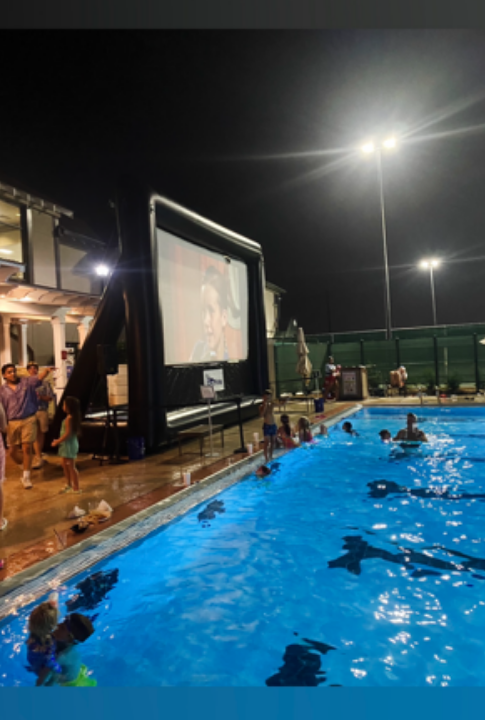
Projection Screen Tyes

Types of Projector Screens Explained | ABC Computer & Audio-Visual Experts

 and

Understanding the various types of projector screens is crucial. Your choice impacts the viewing experience. There are several kinds, each with unique features. Familiarize yourself with these to make an informed decision. Selecting the right type ensures compatibility with your projector and space.


Common Projector Screen Types:

  1. Variety of Projector Screens
  2. - Fixed Frame Projector Screens
  3. - Retractable Projector Screens
  4. - Portable Projector Screens
  5. - Outdoor Projector Screens


Fixed frame screens are known for their taut surfaces. This ensures a consistently flat display.


Retractable screens, both manual and motorized, offer flexibility in multi-use spaces and are typically built into certain event venues. When choosing a venue for your event, asking the Hotel Event Services Coordinator or other Venue Events Coordinator about your reserved room features is an important, yet free and easy step, that any event planner may take to better clarify their event equipment needs.


Portable screens are easy to transport and set up. They are ideal for temporary presentations.


Outdoor screens are built to withstand weather conditions. They bring cinema-like experiences to your backyard.


GENERAL RULE OF THUMB: Consider your particular event speaker or speakers when thinking of your projector screen equipment needs. Each type of projector screen available caters best to different and particular event spaces/environments and audiences of various sizes.


Choosing a projector screen involves more than just picking a size. Therefore, understanding key features will help you get it right.
Key Considerations

Key Features of Projector Screens | ABC Computer & Audio-Visual

Variety of Projector Screens


  • Screen Material: Impacts clarity and contrast.
  • Screen Gain: Affects brightness and viewing angle.
  • Aspect Ratio: Ensures compatibility with content.
  • Size: Depends on room dimensions and audience size.

Understanding these basics helps in making informed decisions. It ensures you get the best viewing experience possible.


When considering gain, know that this measures screen reflectivity. A higher gain produces brighter images.


When Choosing a Projector Screen for your Occasion


Screen Size & Material

Aspect Ratio and Screen Size

Comparative Aspect Ratios for Projectors | ABC Computer and Audio Visual Rental of Louisiana | Image Source: by Kevin Doyle (https://unsplash.com/@kevdoy) | Image Source: Adrien Olichon (https://unsplash.com/@adrienolichon)


Aspect ratio is all about matching your screen to the projector. It ensures the projected image fits perfectly.

Common aspect ratios include 16:9 for HDTV and 4:3 for business presentations.


Selecting the right screen size depends on your room space and audience.


A larger screen requires a greater viewing distance. Consider how many viewers you expect.


Screen Material

The screen material greatly affects the image quality of your presentation media. Different materials suit different viewing environments.


Here's a quick overview of common screen materials:

  • Matte White: Balanced brightness and wide viewing angles.
  • Glass Bead: Increased brightness for controlled lighting areas.
  • High Contrast Gray: Improved contrast in well-lit rooms.


A matte white screen is versatile. It's perfect for evenly diffused light reflections, offering balanced brightness.


Glass bead screens enhance brightness. They work well in darker rooms or controlled lighting setups. Also, don't forget and keep the screen material and gain in mind as well. The combination of the projection screen material and gain additionally influence the projected image's clarity and brightness, so these settings should be adjusted (i.e. glass bead screen setup adjustments per other variables).


High-contrast gray screens are ideal for enhancing black levels. They work best in rooms with ambient light.


Fixed Frame Projector Screens

Fixed Frame Projector Screens

Fixed Frame Projector Screen Setup


Fixed frame projector screens offer a stable viewing surface. They are mounted permanently, providing a professional look.

These screens are ideal for home theaters. The fixed nature ensures a wrinkle-free display every time.


With a fixed frame, image quality remains consistent. This is crucial for serious movie enthusiasts.


One of the benefits is their simple installation. Most require basic tools and clear instructions for setup.


Here are the benefits of fixed frame screens:

  • Tensioned Surface: Ensures a flat, wrinkle-free display.
  • Professional Aesthetic: Provides a sleek, polished look.
  • Consistent Image Quality: Stability enhances viewing experience.


While more costly upfront, their durability is worth the investment. This makes them popular among dedicated cinema lovers.


Retractable Projector Screens (Manual & Motorized)

Retractable screens offer flexibility. They can be stored when not needed, saving space.


Manual retractable screens are easy to set up and take down. They offer a cost-effective option for versatile spaces.


Motorized retractable screens add convenience. Controlling these remotely is a typical adjustment feature of these setups. These are great for multi-purpose spaces. One can transition from a restaurant space or conference room to a speaking engagement dinner.


ABC's flexible options are sufficient to provide audio-visual equipment and bulk services for complex and more involved convention AV sound systems, commercial PA speaker systems, Shure microphones, reliable lavalier mics, optional handheld mic or podium microphone, event visual, and speaker scenarios. Availability of motorized retractable projector screens will primarily depend on your venue and event space. Each event location has particular venue requirements, limits, and guidelines for contractors to follow. ABC AV is well-versed on navigating this area of event logistics and coordination. Let ABC help you coordinate your venue needs today. Customize your audiovisual rental gear and we can adjust your service agreement according to the delivered services.


Advantages of retractable screens include:

  • Space-Saving: Easily storable when not in use.
  • Convenience: Motorized options offer remote control.
  • Versatility: Suitable for varied setups.

Consider the trade-off between manual and motorized. The latter may be pricier, but the ease of use is appealing.

Portable Projector Screens

Portable Projector Screens | ABC Audio-Visual


Portable projector screens are perfect for mobility. They meet the needs of those on the go and ABC A/V is your go-to!


These screens are quick to assemble. Most models fold or roll into compact sizes for easy transport.

Applications range from business presentations to impromptu movie nights. They're versatile for any occasion. With various styles and sizes, you can find a screen fitting your needs. Portability doesn't sacrifice quality.

Portable Projector Screen with Tripod provided by ABC Computer and Audio Visual Rental | Image Source: by Roman (https://unsplash.com/@timesnewroman14)


Key features of portable screens:

  • - Lightweight Design: Easy to carry around.
  • - Quick Setup: Ideal for fast, temporary installations.
  • - Variety of Sizes: Suitable for both small and large audiences.


Two common types of portable screens:

  1. - Tripod Screens
  2. - Tabletop Screens


Tripod screens are stable and adjustable.


Tabletop options are compact, ideal for limited spaces. Despite their ease of use, proper maintenance prolongs lifespan and ABC regularly checks and inspects its expansive equipment warehouse of inventory to ensure that equipment deliveries deliver seamless functionality for you throughout your event.

Outdoor Projector Screens

Outdoor Projector Screens | ABC A/V

Outdoor Projector Screen Delivery-to-Pick-Up and Setup Rental Services | Image Source: by kimber (https://unsplash.com/@kimmberr)

Outdoor projector screens transform your garden into a cinema. They provide entertainment under the stars.


These screens are designed for weather resistance. Materials often include UV protection and mildew resistance.


Installation varies. Some come with frames or stakes for stability. These are excellent for social gatherings and events. We offer straight-forward AV projector screen setups suitable for your outdoor venue whether a rented park area or other private or public event.


Notable features of outdoor screens:

  • Weatherproof: Built to withstand outdoor conditions.
  • Large Sizes Available: Perfect for big audience gatherings.
  • Easy Setup: Many feature user-friendly installation.

Popular Outdoor Projector Screen Types:

  1. - Inflatable Screens
  2. - Fast-Folding Screens


Inflatable screens are easy to set up and takedown. Fast-folding models are sturdy and simple. Keep in mind the exposure to elements.


Because regular cleaning and maintenance extend the service life of Outdoor Projector Screen Types, ABC Computer and Audio Visual Rental pays extra special attention to its maintenance of its exclusive and expansive audio-visual equipment rental inventory of varied sizes of projection screens of various types.


Outdoor screens create memorable viewing experiences. Combining technology with nature elevates any gathering.


Aspect ratios and screen sizes to consider:

  • 16:9: Common for home theaters and movies.
  • 4:3: Standard for presentations and older content.
  • 2.35:1: For cinematic experiences and wide aspect movies.

Aspect ratio ties directly to projector output. Ensure compatibility for the best viewing experience.

Match Screen to Space

Matching Your Projector Screen to Your Space

The right projector screen complements your space. Consider your room layout and audience needs.

For home theaters, ambiance is crucial. Choose a screen that suits your room size and seating arrangement.

In offices, functionality prevails. Screens should enhance presentation clarity and adapt to varying light conditions.

Outdoor settings require weather-resilient features. Ensure stability against wind and weather changes.


Here are space considerations for different setups:

  • Home Theaters: Focus on image quality and immersive experience.
  • Offices: Prioritize clarity and ease of setup.
  • Outdoor: Opt for durability and weather resistance.


Ensure your screen matches both the space and viewing purpose. This ensures optimal performance.

A well-matched screen enhances the overall viewing experience. Choose a type that aligns with your specific needs.

Home Theater Setups

Various Projector Screen Setups

Creating a home theater involves selecting a screen that complements your space. Aim for a cinematic experience with the right screen.

Consider the room's dimensions when choosing the screen size. Larger rooms can accommodate bigger screens for immersive viewing.

Opt for a screen with a 16:9 aspect ratio. This is perfect for modern films and streaming content.

Enhance your setup by focusing on these elements:

  • Screen Size: Match to room size for best experience.
  • Aspect Ratio: Use 16:9 for a theater-like feel.
  • Sound: Consider acoustically transparent screens for setups with surround sound.

Home Theater Setupby Tawshif Khan (https://unsplash.com/@tawshif)

With thoughtful selection, your home theater can provide a stunning visual and audio experience. Strive for perfect synergy between screen and sound.

Office and Presentation Spaces

In an office, the right screen can enhance presentations. It should handle data, graphs, and slides with clarity.

Choose a 4:3 aspect ratio screen for traditional presentations. This suits most business content.

Consider retractable screens for versatility. They provide flexibility and easily adapt to varying meeting room setups.

Enhance your office space with these considerations:

  • Aspect Ratio: Opt for 4:3 for presentations.
  • Functionality: Select retractable options for dynamic spaces.
  • Clarity: Ensure screen material aids in clear data projection.

Office Presentation Setupby Garin Chadwick (https://unsplash.com/@garinchadwick)

Choosing a suitable projector screen elevates your presentations. It ensures focus and engagement during crucial meetings.

Outdoor and Event Use

Outdoor projector screens require durability and functionality. They face changing weather and unstable ground conditions.

Choose weather-resistant screens with sturdy frames. This ensures longevity and consistent performance outdoors.

A screen with a wide viewing angle serves large audiences well. It provides clarity from various positions.

Consider these features for outdoor use:

  • Durability: Seek weather-resistant materials and sturdy frames.
  • Stability: Ensure screens are secure in open environments.
  • Visibility: Wide viewing angles cater to large groups.

Outdoor Event Setupby Alexander Mass (https://unsplash.com/@alexandermassph)

With the right setup, outdoor screens can captivate crowds. They transform events with engaging visuals, regardless of location.

Installation and Maintenance Tips

Installing a projector screen can be straightforward or complex, depending on the type. Following the right steps ensures longevity and performance.

Start by choosing a suitable location. Ensure there's enough distance from the projector for optimal projection.

When mounting, use the right hardware. This maintains screen stability and prevents damage.

Consider these installation tips:

  • Location: Ensure clear path between projector and screen.
  • Hardware: Use proper mounts and anchors.
  • Placement: Avoid direct sunlight or obstructions.

Installing a Projector Screenby Michael Kahn (https://unsplash.com/@mklibrary)

Once installed, maintaining your screen is key for preserving image quality. Regular cleaning is a must.

Use a microfiber cloth for dust. For tougher spots, use gentle cleaners compatible with the screen's material.

Keep in mind these maintenance tips:

  • Cleaning: Regularly dust with microfiber.
  • Spot Removal: Use appropriate gentle cleaners.
  • Protection: Avoid harsh sunlight and moisture exposure.

Projector screens can also benefit from occasional adjustment checks. This ensures they remain aligned and tensioned.

Proper installation and maintenance extend the life of your screen. It guarantees a crisp, clear viewing experience every time.

Troubleshooting minor issues early can prevent bigger problems. Invest time in care and maintenance for optimal performance.

Budgeting and Value: Getting the Most for Your Money

Choosing the right projector screen involves balancing cost and features. Understanding your needs helps you make informed purchasing decisions.

Different screens come at various price points, each offering unique benefits. High-end options provide better performance but cost more.

Before buying, determine essential features. This helps avoid overspending on unnecessary extras.

Consider the following factors when budgeting:

  • Screen Type: Fixed frame vs. retractable vs. portable.
  • Size: Larger screens typically cost more.
  • Material: Quality impacts both image and price.
  • Features: Include gain, ambient light rejection, etc.

Different Types of Projector Screens

Affordable projector screens often offer great value. They might lack some advanced features but can meet basic viewing needs.

Look for sales and compare brands. Often, lesser-known brands offer similar quality at reduced prices.

Consider future upgrades. Buying a screen that supports advanced technology can save money long-term.

Prioritize what enhances your experience. Focusing on relevant features ensures a satisfying purchase.

With smart budgeting, you can achieve an excellent viewing setup. Gain the most satisfaction without exceeding your financial limits.

Frequently Asked Questions About Projector Screens

Navigating the world of projector screens can be confusing. Below are answers to common questions that can clear up your doubts.

1. What is the best screen size for my space?

Choosing the right size depends on room dimensions and viewing distance. Larger rooms may accommodate bigger screens comfortably.

Consider these factors:

  • Viewing distance: Optimal size depends on how far you'll sit.
  • Room size: Ensure there's enough wall space for your screen.

2. Should I choose a motorized screen?

Motorized screens offer convenience but come at a higher price point. They're ideal for multipurpose spaces where ease of setup is essential.

Benefits include:

  • Ease of use: Automate the setup process.
  • Space-saving: Retract when not in use, freeing up space.

3. Do I need a high-gain screen?

High-gain screens increase brightness but can reduce viewing angles. They're best for controlled lighting environments.

4. Can I use indoor screens outside?

Indoor screens lack weather resistance. Opt for outdoor projector screens designed to withstand elements.

5. How do I clean my projector screen?

Regular screen maintenance ensures optimal performance. Use a soft cloth and mild cleaner, avoiding harsh chemicals.

Conclusion: Making the Right Choice for Your Needs

In summary, selecting the best projector screen requires thoughtful consideration. Each aspect of the screen impacts your viewing experience. Whether you desire vibrant colors or crave convenience, evaluate your needs carefully.

Consider the type of space where the screen will be used most. A home theater setup might require a different screen than an outdoor venue. Each environment presents unique challenges and opportunities for projection.

Here are key points to remember:

  • Evaluate your space: Size and lighting influence screen choice.
  • Decide on screen type: Fixed, portable, or motorized, based on flexibility and use.
  • Balance budget and quality: Quality screens enhance visual pleasure but require investment.

By investing time to research and compare options, you ensure a satisfying and immersive viewing experience for years to come. Make informed decisions, and let your projector screen elevate your media enjoyment.


Screen Gain


How Can We Best Help You With Your Event?

Contact Us


ABC Computer and Audio Visual Rental has a larger service coverage area than most regional audiovisualExternal link opens in new tab or window companies, and we are the only direct External link opens in new tab or windownationwide rental and service provider of audiovisual equipment in the country. We are your single-source provider of any event-related audiovisual and technology equipment as well as on-site support services for conventions, conferences, educational events, and beyond.


1026300
Invalid Form properties detected


 REQUEST GEAR AVAILABILITY

 SCHEDULE A RENTAL

 REQUEST AN EVENT QUOTE


 AUDIO EQUIPMENT RENTAL(S) Including:  Microphones (handheld and/or wireless lavalier mic options), PA sound system, PA Speakers, Digital Mixer Setup, Concert Media, Web-conferencing Audio Requests, etc.

 VISUAL EQUIPMENT RENTAL(S) Including:  4K up to 10K Projector Rentals, Commercial Short-Throw and Ultra-Short-Throw Projectors, Custom Projection Screen Setups, Professional Stage Curtains/Drapes, HD 4K / UHD TV Display Monitors of many sizes for your perfect event screens, presentation laptop options, or other visual event technology services/requests

 STAGING EQUIPMENT RENTAL(S) Including:  Podium(s), Stage/Hi-Rise, Pipe and Drape Curtains, Projector Screens with Curtains, Special Audio and/or Visual Presentations, Display Monitor Arrangements, or otherwise


Who is making this reservation? Please enter your First and Last Name: 


Which individual, organization, company, venue, or other entity/entities is the primary contact for this reservation?

Your Email:

Event Date:  YYYY-MM-DD

Feedback:

I.e. Event Audio Needs, Event Visual Needs, Equipment Rental, Event Technology, Projection Screens/Projectors, Other Staging Service Request

External link opens in new tab or windowSubmit FormSubmit Form


Where can ABC AV help you today?


External link opens in new tab or windowTELL US WHAT YOU'RE LOOKING FOR.


We are used to working within client budgets and providing smoothly executed audio setups and visual experiences throughout your event. Have your own plans? Let's discuss your equipment rental and scheduling needs.


No need to compromise on quality with the AV quality assurance of reliable service provision. ABC's comprehensive and exclusive inventory of audio and visual equipment undergoes regular inspection and replacement or maintenance repairs to ensure that all equipment and services deliver optimal performance.

External link opens in new tab or windowHOW ABC CAN HELP YOU WITH YOUR EVENT? 


EVENT AV SERVICES - Event equipment logistics - Equipment Assembly - Equipment Delivery - Custom AV Quote - Custom Projector Setup - Custom Projection Staging Design - AV Staging Supplies - Staging Equipment
COMMERCIAL PROJECTORS - Projector Tripods - Tripod projection screens - Roll-down projector screens - All projector equipment rental options are available in a wide variety of standard and custom projection screen sizes to precisely fit any indoor event venue, event room, or open event areas / auditorium / concert hall / music hall / civic center / community center - Outdoor event projector - Outdoor Projector Staging - Outdoor projection power - On-site equipment delivery - On-site equipment room delivery - Custom projection screen configurations - HIGH DEFINTION PROJECTORS - Commercial HD SHORT-THROW PROJECTORS - HD short throw projection accessories - Short-throw projector rentals - Louisiana Projector Rentals - Mississippi Projector Rentals - ULTRA HIGH DEFINITION SHORT-THROW PROJECTORS - Commercial UHD Short-Throw Projectors
PROJECTOR SCREENS - HD Projectors - 3000 lumens - 4000 lumens - 5000 lumen - 5K - UHD Projector - 6000 lumens - 7000 lumens - 8000 lumens - 8K - 10,000 lumens - 10K - LED Projector - led rentals - PROJECTION POWER SUPPLY SYSTEM - Projection Specialists - Specialty Projector Rentals - Custom Industrial projector screens
PROJECTOR STAGING - Projector skirt - Multiple projector skirts or Bulk Order Projector Setups
HD DISPLAY MONITORS - All Standard Sizes available for your events Elevate your event with Digital Signage display options - HIGH-DEFINITION TELEVISION SCREENS - 4K TV - HDTV - Full color spectrum display monitors - Vibrant picture and lifelike image clarity - Professional Monitor Mounting services - Bulk HD LCD monitor orders for your convention or convention series / trade show or tradeshow / roadshow or road shows/ auto show or car showcase

https://0201.nccdn.net/4_2/000/000/008/486/6.jpg
https://0201.nccdn.net/1_2/000/000/180/960/8.jpg
https://0201.nccdn.net/4_2/000/000/038/2d3/abc-commercial-audio-sound-sys-graphic-1000x1000.jpg
https://0201.nccdn.net/1_2/000/000/116/424/abc-display-monitor-graphic-1000x1000.jpg
https://0201.nccdn.net/1_2/000/000/114/01f/abc-lav-and-handheld-microphones-graphic-1000x1000.jpg
https://0201.nccdn.net/1_2/000/000/0d1/eb9/abc-pa-sound-systems-graphic-1000x1000.jpg
0

Complete Project Management

Our extensive resources allow us to identify the best way to realize your vision while continually looking for ways to save you money. Through our expansive network, we provide consistent, nationwide pricing with no hidden fees.


Planning and Preparation

Looking for an affordable AV option? We are used to working within client budgets and providing smoothly executed audio setups and visual experiences throughout your event. Have your own plans? Let's discuss your equipment rental and scheduling needs. Read more about ABC's family-owned, budget-friendly solutions and competitive cost of ABC by clicking here.

Post-Conference Services

At ABC Computer and Audio Visual Rental, we understand that just because the event is over, the work is not. External link opens in new tab or windowRead more about our POST-EVENT SERVICES by clicking here.

  • Need help planning and preparing for an upcoming event? Click to read more about Event Logistics.
  • AV Management or  Specialty Event Services.
  • Contact ABC today here. to request a quote, schedule a rental, or send us a message.
  • Need help scheduling a rental reservation? Connect with ABC Now by clicking here, giving us a call, or sending us an email.

  • External link opens in new tab or window+1.5048589253
  • External link opens in new tab or windownolan@abccomputerrental.com
  • External link opens in new tab or windowMetairie, Greater New Orleans Metro Area, Louisiana, 70002, United States


Phone: External link opens in new tab or window(504) 858-9253 | Email: nolan@ABCcomputerrental.com


We serve a broad range of clients and their needs across Louisiana and surrounding areas, including:

Greater New Orleans Metropolitan Area + Greater Baton Rouge Metropolitan Area + Metairie / Kenner / Covington / Laplace/ Hammond / Mandeville / Madisonville / Gretna / Algiers / Algiers Point / Harvey / Marrero / Slidell / Morgan City / Thibodaux / Bogalusa / Gonzales / Hammond / Lafayette / Chalmette / Ponchatoula / Houma / Boutte / Gentilly /  Belle Chasse / St. Bernard / St. Francisville / Biloxi, Mississippi / Gulfport, Mississippi / and BEYOND!

Included Neighborhoods: Uptown / French Quarter / Central Business District (CBD) / Warehouse District of Downtown New Orleans / Lakeview / West End / Old Metairie / Irish Channel / Upper Garden District / Lower Garden District / Marigny / Bywater / Westbank / Eastbank / Avondale / Lakefront / Lakeview / Elmwood / Broadmoor / Central City / New Orleans East / Included Parishes Areas: Orleans Parish / Jefferson Parish / St. Bernard Parish / East Baton Rouge Parish / West Baton Rouge Parish / Lafayette Parish / Ascension Parish / St. James Parish / Assumption Parish


    

External link opens in new tab or window


HOME | External link opens in new tab or windowSERVICE AREAS | External link opens in new tab or windowEQUIPMENT RENTALS | External link opens in new tab or windowEVENT SERVICES | External link opens in new tab or windowCONTACT US


External link opens in new tab or windowREQUEST A QUOTE | External link opens in new tab or windowSEND US A MESSAGE | SCHEDULE A RENTAL | LEARN MORE ABOUT ABC


FEATURED AUDIO VISUAL BUSINESS ON External link opens in new tab or windowNEW ORLEANS & COMPANY TOURISM GUIDE AND ON External link opens in new tab or windowYELP | MICROSOFT External link opens in new tab or windowBING External link opens in new tab or windowMAPS | External link opens in new tab or windowGOOGLE MAPS | External link opens in new tab or windowYAHOO LOCAL | External link opens in new tab or windowREVIEW ON GOOGLE | External link opens in new tab or windowREVIEW ON YELP | External link opens in new tab or windowLINKEDIN | External link opens in new tab or windowREDDIT


https://0201.nccdn.net/4_2/000/000/008/486/6.jpg
https://0201.nccdn.net/1_2/000/000/180/960/8.jpg
https://0201.nccdn.net/4_2/000/000/038/2d3/abc-commercial-audio-sound-sys-graphic-1000x1000.jpg
https://0201.nccdn.net/1_2/000/000/116/424/abc-display-monitor-graphic-1000x1000.jpg
https://0201.nccdn.net/1_2/000/000/114/01f/abc-lav-and-handheld-microphones-graphic-1000x1000.jpg
https://0201.nccdn.net/1_2/000/000/0d1/eb9/abc-pa-sound-systems-graphic-1000x1000.jpg
https://0201.nccdn.net/1_2/000/000/17e/3c4/computer-rental-graphic-040626.jpg
0


(
Customer Support
Hello! How can we assist you today?
close lightbox